
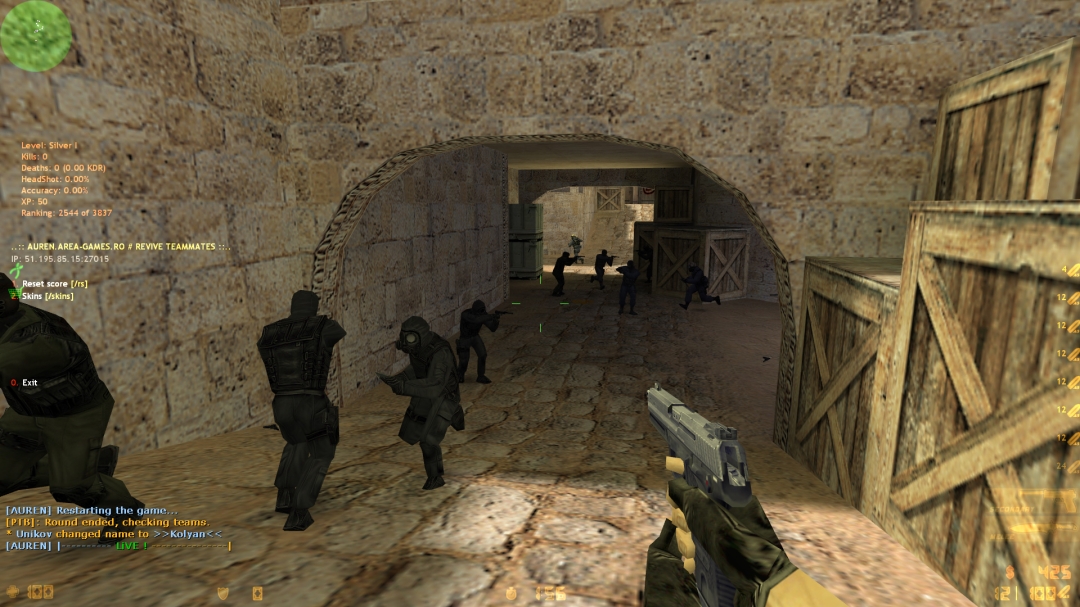
Imagine this: you're on de_inferno, heart pounding like mad, storming B site with your AK laying down perfect sprays. 1v3, and you're clutching it hard. That's the real rush. Counter-Strike 1.6 didn't go anywhere - it just got even better. But man, that old Steam client on modern PCs is straight-up infuriating: lags out, crashes constantly, downloads maps at snail pace, and doesn't even know what a proper widescreen is. Enter NextClient, the latest update from a dedicated dev team breathing fresh life into this legendary shooter. This isn't some shady pirate mod – it's built on official Steam build 8684, open-source, and packed with features that make you feel like you're playing the classic while owning 2026 hardware.
Why NextClient is Your New Best Friend in CS 1.6
Imagine queuing for a casual 5v5, but instead of lagging downloads and blurry 4:3 screens, you slide into matches buttery smooth. That's NextClient for you. Players flock to it because it fixes every pain point of vanilla CS 1.6 without touching the core gameplay you love – no forced skins, no pay-to-win nonsense.
First off, security is god-tier. The built-in protector blocks malicious server commands, dodgy files, and common cheats like slowhacks. You connect to public servers without fearing your PC turning into a botnet zombie. Servers can't force weird cvars on you anymore – everything resets safely on disconnect.
Then there's the interface glow-up. Picture a sleek menu with Steam avatars popping in the scoreboard, customizable themes (classic dark or vibrant plus), and real-time download speeds in Mbps. No more guessing if that 500MB map pack will finish before bedtime. Multithreaded downloads mean you grab resources lightning-fast, even on spotty Wi-Fi.
Performance? Night and day. Widescreen FOV fix lets you peek corners properly on your ultrawide without fish-eye distortion. Viewmodel tweaks from CS:GO – adjustable bob, sway, and offsets – make your gun feel alive, perfect for those immersive sprays. And the killfeed? Icons for wallbangs, smoke kills, and aces make every highlight reel-worthy.
Why do vets choose it? Stability on Windows 11, no NVIDIA crashes, HP display over 255 for zombie modes, and experimental Steam overlay for friends lists. It's like CS 1.6 grew up but kept its soul. If you're hunting a reliable download CS 1.6 spot, NextClient bundles make it seamless – pure, protected bliss.
Build Your Own NextClient: From Source to Spray Mastery
Tired of pre-built clients? Roll up your sleeves and compile NextClient yourself. With the full source on GitHub, you're in control – tweak code, add personal mods, ensure it's virus-free. It's empowering, like modding your first AMX plugin back in 2005.
Here's your step-by-step guide. Grab Visual Studio 2022 (Community edition is free), CMake 3.21+, and Ninja build tool.
-
Clone the Repo: Fire up Git Bash or Command Prompt. Run: git clone --recurse-submodules https://github.com/CS-NextClient/NextClient.git This pulls the full source, including submodules like csldr for viewmodel magic.
-
Prep the Build Folder: cd NextClientcmake -G "Ninja" -B cmake-build-release -DCMAKE_BUILD_TYPE=Release This generates build files. Ninja's fast; skip if you prefer NMake.
-
Compile Everything: cmake --build cmake-build-release -t BUILD_ALL Grab coffee – it takes 5-10 minutes on a decent rig. Outputs land in the build folder.
-
Install to Your CS Folder: Set an env var: set NEXTCLIENT_INSTALL_DIR=C:GamesCS16 (your path here) Rerun CMake, then: cmake --build cmake-build-release -t INSTALL_ALL Boom – fresh client ready.
-
Setup Game Files: Copy official Steam CS 1.6 (beta branch: "steam_legacy - Pre-25th Anniversary Build") outside Steam folder. Rename steam_api.dll to steam_api_orig.dll. Drop your built files in. Launch cstrike.exe.
Troubleshoot? Check logs in console. Common fix: Update vcpkg dependencies if errors pop. Result? A custom client tailored for your bhop scripts or low-latency tweaks. Devs even fixed dual-GPU bugs – your RTX 4090 hums happily.
This DIY approach means ultimate trust. No middleman, pure code you verified.
Snag NextClient from Trusted Spots – Easy as a NoScope
Ready to jump in? NextClient downloads are everywhere, but stick to reputable ones for safety. Sites like cs-install.com bundle full Counter-Strike 1.6 setups with NextClient baked in – installers handle everything. Want raw? Grab the GitHub source and build as above.
Always scan with VirusTotal, run as admin first time. Pro tip: Verify against GitHub hashes for peace of mind.
5 Killer Modifications That Reshape Your CS 1.6 Matches
NextClient's dev crew dropped five game-altering mods. These aren't reskins – they tweak mechanics, visuals, and servers in ways that amp chaos and skill. Let's break 'em down: impact, pros, cons. Get ready for clutches that feel next-gen.
1. Enhanced Protector & Cvar Sandbox
What it does: Locks client cvars servers set (FOV, crosshair), blocks exploits. Resets on leave.
Game impact: Servers force optimal settings for modes like surf or KZ without cheats. No more eco-round sabotage via bad binds.
Pros:
-
Ironclad anti-cheat – say goodbye to command-injection hackers.
-
Custom per-server tweaks enhance immersion (e.g., zombie FOV boosts).
-
Zero performance hit.
Cons:
-
Limits wild client-side hacks (sorry, macro lovers).
-
Rare sandbox glitches on old AMX versions.
2. Redesigned Killfeed with Icons & Avatars
What it does: Steam avatars in scoreboard, icons for kills (HE, flash, wallbang), toggle old-style. Up to 10 entries.
Game impact: Spot patterns instantly – "that guy's stacking A with smokes." Makes rotates smarter, turns feeds into intel goldmines.
Pros:
-
Epic highlight vibes, like watching your ace replay live.
-
Avatars add personality to pubs.
-
Customizable for clean HUDs.
Cons:
-
Clutters screen in 10v10 chaos.
-
Icons need server API module.
3. Multithreaded FastDL & Server Browser
What it does: Parallel downloads for maps/models, friends tab in Steam mode, gzip support.
Game impact: Joins in seconds, not minutes. Queue times drop, frustration melts – perfect for quick saves or drops.
Pros:
-
Mbps speeds on any connection.
-
Clean list filters bots/full servers.
-
Auto-connect smarts.
Cons:
-
Eats more RAM on low-end PCs.
-
Steam mode experimental (overlay quirks).
4. Advanced Viewmodel Overhaul
What it does: CS:GO bob/sway/lag, offsets (x/y/z), inspection, disable shift. Bone cam, rollangle.
Game impact: Guns move realistically – peek feels fluid, sprays immersive. Boosts aim precision for pros.
Pros:
-
Modern feel without Source bloat.
-
Cvar-tweakable for comfort.
-
Hor+ FOV scales perfectly.
Cons:
-
Learning curve for old-timers.
-
Minor FPS dip on potatoes.
5. Sprite API & Server Dev Tools
What it does: 32 sprites (vs 8), color/frame/render control. Precache separation, weapon icons in feed.
Game impact: Servers add HUD hints, custom effects – dynamic events, better zombie modes. Your matches evolve.
Pros:
-
Infinite creativity for mapmakers.
-
Client verification gates VIP perks.
-
Lightweight, reversible.
Cons:
-
Requires AMX Mod X module.
-
Overuse = visual spam.
These mods blend nostalgia with innovation, making every peek and rotate count harder.
Dust off that mouse, fire up NextClient, and relive the glory – but sharper, safer, unstoppable. Download from trusted sites or compile from GitHub today, hop on unikov.net servers, and stack those frags. The counter-terrorists won't know what hit 'em. Your legend awaits.
Media Contact
Company Name: NextClient
Email: Send Email
Country: United States
Website: https://cs-install.com/